The goal of this project is to implement the bug0 algorithm to enable a mobile robot to navigate a 3D space. The robot's objective is to reach specified target coordinates while effectively avoiding obstacles within a virtual environment simulated using Gazebo, the standard virtual simulator of ROS.
The project requires the creation of three nodes within the new package, each serving a distinct purpose. Here is an overview of their functionalities:
-
Action Client Node: This node acts as an action client, allowing users to set target positions (x, y) for the robot or cancel the current target. Additionally, it publishes the robot's position and velocity as a custom message (x, y, vel_x, vel_z) by utilizing the values published on the /odom topic. If necessary, you have the flexibility to develop two separate nodes: one for the user interface and another for publishing the custom message.
-
Service Node: This node implements a service that, upon invocation, prints the number of goals reached and the number of goals cancelled. It serves as a convenient way to obtain this information.
-
Position and Velocity Subscriber Node: This node subscribes to the robot's position and velocity using the custom message. It calculates and prints the distance between the robot and the target position, as well as the robot's average speed. You can adjust the publishing frequency of this information using a parameter.
In addition to the nodes, the package also includes a launch file to simplify the setup of the entire simulation. This launch file initializes all the required nodes and allows you to configure the publishing frequency for the information published by node (c).
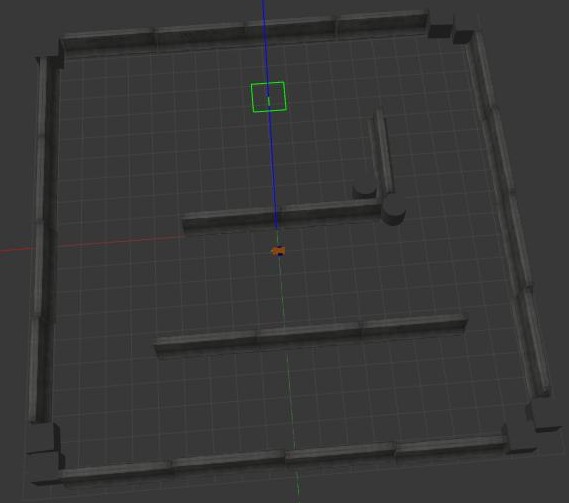
To run the program, we have to install xterm:
$ sudo apt-get install xtermand SciPy:
$ sudo apt-get install python3-scipyGo inside the src folder of your ROS workspace and clone the repository folder:
$ git clone https://github.com/teolima99/second_assignment_RT1.gitThen, from the root directory of your ROS workspace, run the command:
$ catkin_makeYou can run $ roscore in a terminal or skip it. Anyway, it will be runned automatically. Run the string below to start the programme:
$ roslaunch assignment_2_2022 assignment2.launchCheck your python version running:
$ python --versionIf it appears Python 3, there is no problem. If it appears Python 2, run this:
$ sudo apt-get install python-is-python3Inside ~/<your ros workspace folder>/src/assignment_2_2022/scripts/ there are 6 python files:
bug_as.py: The action server node receives the requested position from the client and invokes the necessary services to navigate the robot to the specified location.;input.py: The action client node is responsible for prompting the user to input the X and Y coordinates of the desired final destination for the robot or delete them. Subsequently, it publishes the robot's position and speed as a custom message on the "/position_velocity" topic, using the values obtained from the "/odom" topic.printer.py: The node prints the distance between the robot and the target position, as well as its average speed, on the terminal. These parameters are extracted from the "/position_velocity" topic as a custom message.go_to_point_service.py: implementation of a service node. When called, it moves the robot to the requested position.wall_follow_service.py: implementation of a service node. When called, it allows the robot to move around an obstacle (in our case a wall).service.py: it is a service node. When called, it prints the number of successful reached targets and the number of cancelled targets.

Here are some ideas for future improvements:
- Implementation of Additional Navigation Algorithms: In addition to the bug0 algorithm currently used, consider implementing other navigation algorithms such as bug1, bug2, potential field, RRT (Rapidly-exploring Random Tree), A* (A-star), or D* (D-star). This would expand the robot's navigation options and allow for evaluation and comparison of the performance of different algorithms.
- Sensor Integration: Explore adding sensors to the robot, such as proximity sensors, cameras, or Lidar sensors, to improve perception of the surrounding environment. These sensors can be used to more accurately detect obstacles and enable safer and more robust navigation.
- Path Planning Algorithm Implementation: Alongside the bug0 algorithm, develop a path planning algorithm to enable the robot to calculate an optimal path to reach the target while avoiding obstacles. For example, implement the A* or D* algorithm to compute an efficient and safe path.
- Performance Optimization: Evaluate and optimize the overall system's performance. This could involve optimizing the computational efficiency of implemented algorithms, efficiently managing system resources, or identifying and resolving any latency or delay issues.