





FileRise is a self-hosted web file manager and storage hub with WebDAV, sharing, and per-folder ACLs. Drag & drop uploads, OnlyOffice integration, and optional folder-level encryption at rest — all in one PHP app you control.
Quick links: Website • Docs • Live demo • Install • FileRise Pro
-
Built for: anyone who wants a fast, self-hosted file manager, storage hub, client portal, and AI workflow workspace on their own infrastructure.
-
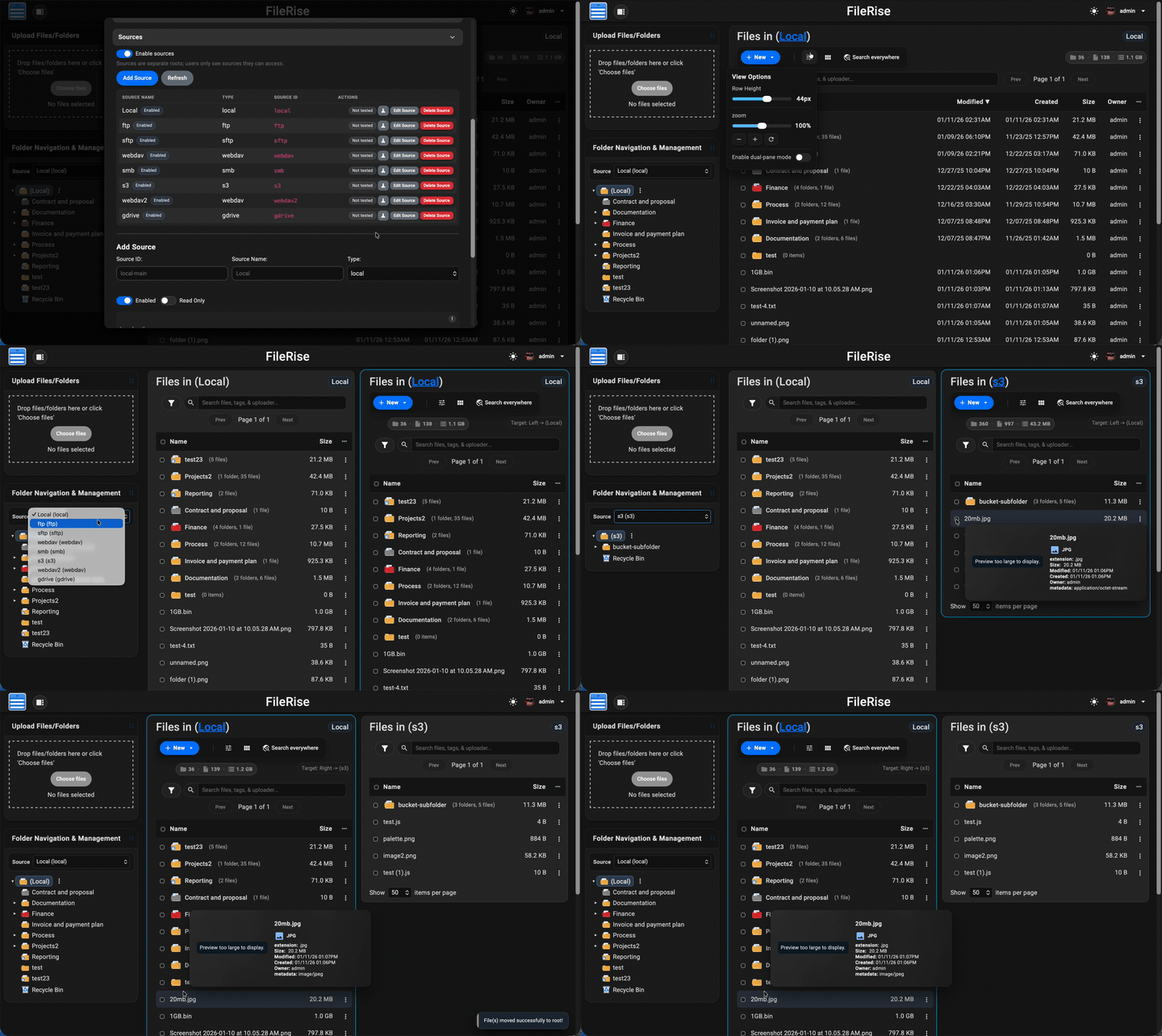
Core (MIT): full open-source FileRise feature set (ACLs, folder and file sharing, uploads, tags/search, PDF previews, and more), plus multiple local roots and WebDAV sources for storage-hub workflows.
-
Pro: adds user groups, client portals, automation, additional source adapters, gateway shares, search everywhere/audit tooling, and a permissions-aware AI workspace for structured extraction, organization, approvals, and scoped copilots.
-
FileRise Pro AI Chat: Extract Invoice Fields to JSON and CSV


- Quick links
- Install (Docker – recommended)
- Manual install (PHP web server)
- After install (5 minutes)
- Data & backups
- First-run security checklist
- Optional dependencies
- WebDAV & ONLYOFFICE (optional)
- Security & updates
- Community, support & contributing
- AI Disclosure
- License & third-party code
- Press
- 💾 Self-hosted “cloud drive” – Runs anywhere with PHP (or via Docker). No external database required.
- 🔐 Granular per-folder ACLs – Manage View (all/own), Upload, Create, Edit, Rename, Move, Copy, Delete, Extract, Share, and more — all enforced consistently across the UI, API, and WebDAV.
- 🔗 Link File (authenticated deep links) – Generate internal links to specific files, require login + ACL checks, and open directly to the target in the app.
- 🤝 Folder and file sharing – Share folders for browsing or upload-only file requests, protect links with passwords/expiration, and share individual files with generated links.
- 📥 File Request links (upload-only) – Share upload-only links so external users can submit files into a folder without browsing existing files.
- 📄 PDF viewing + optional local PDF thumbnails – View PDFs inline in the preview modal, and optionally enable first-page PDF thumbnails for gallery cards and hover previews using
pdftoppm. - 🔐 Folder-level encryption at rest (optional) – Encrypt entire folders (and all descendants) on disk using modern authenticated encryption.
- Opt-in per folder with inherited protection for subfolders
- Files are stored encrypted on disk and transparently decrypted on download
- Master key can be generated by FileRise or supplied via environment variable
- When enabled, incompatible features (WebDAV, sharing, ZIP operations, OnlyOffice) are automatically disabled for safety
- 🔄 Fast drag-and-drop uploads – Chunked, resumable uploads with pause/resume and progress tracking. If your connection drops, FileRise resumes automatically.
- 🪟 Dual-pane mode + keyboard shortcuts – Optional two-pane file browser for fast workflows (copy/move between panes, compare folders, and operate without the mouse). Shortcut overlay + hotkeys (F3 preview, F4 edit, F5 copy, F6 move, F7 new folder, Del delete,
/search). - 🌳 Scales to huge trees – Tested with 100k+ folders in the sidebar tree without choking the UI.
- 🌈 Visual organization – Color-code folders in the tree, inline list, and folder strip, plus tag files with color-coded labels for fast visual scanning.
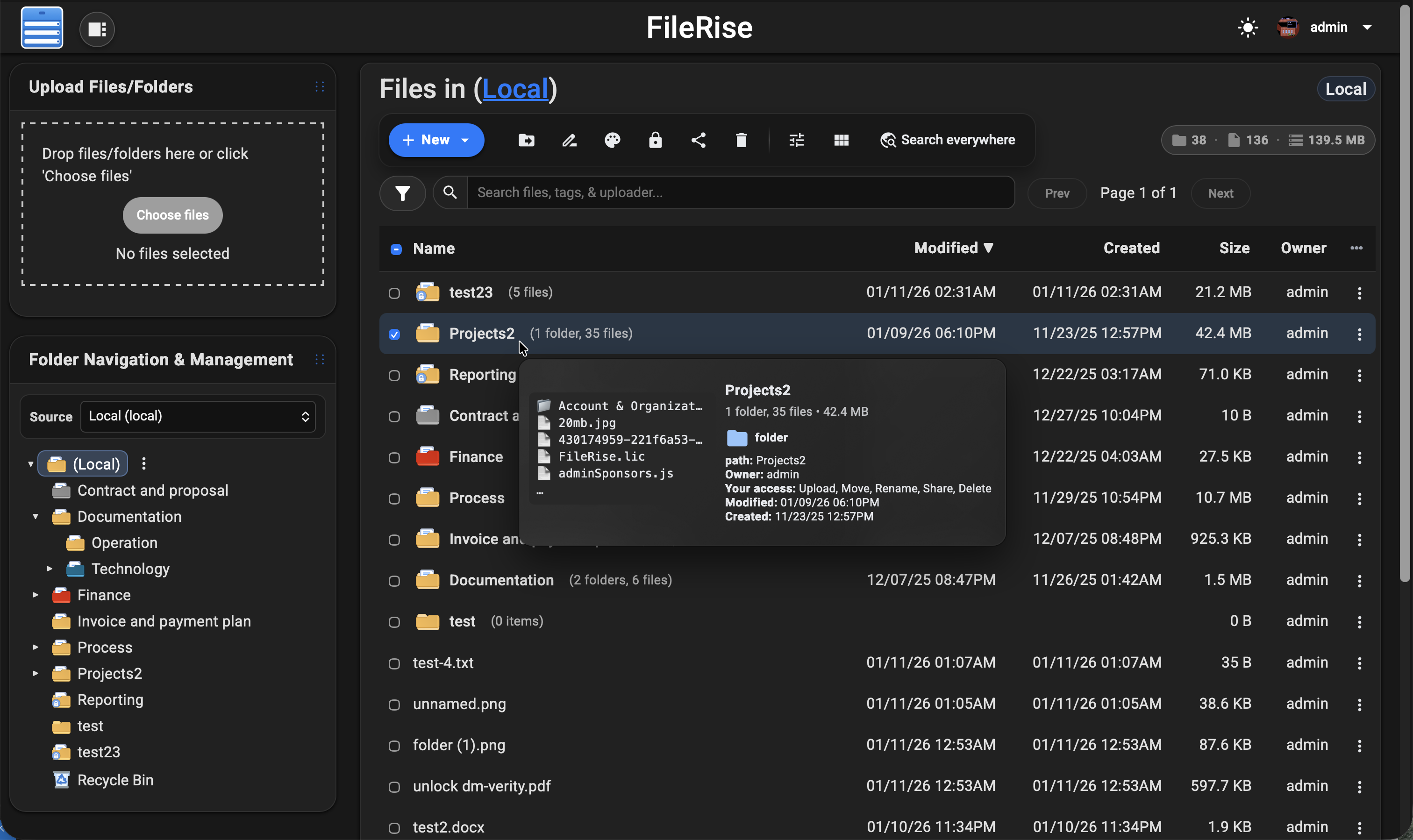
- 👀 Hover preview “peek” cards – On desktop, hover files or folders to see thumbnails (images/video), quick metadata (size, timestamps, tags), and effective permissions. Per-user toggle stored in
localStorage. - 🎬 Smart media handling – Track per-file video watch progress with a “watched” indicator, remember last volume/mute state, and reset progress when needed.
- 🧩 OnlyOffice support (optional) – Edit DOCX/XLSX/PPTX using your own Document Server; ODT/ODS/ODP supported as well. PDFs can be viewed inline.
- 🌍 WebDAV (ACL-aware) – Mount FileRise as a drive from macOS, Windows, Linux, or Cyberduck/WinSCP. Listings, uploads, overwrites, deletes, and folder creation all honor the same ACLs as the web UI.
- 🏷️ Tags, search & trash – Tag files, search by name/tag/uploader/content via fuzzy search, and recover mistakes using a Trash with time-based retention.
- 📚 API + live docs – OpenAPI spec served at
api.php?spec=1(fromopenapi.json.dist) with a Redoc UI atapi.php(login required). - 📊 Storage / disk usage summary – CLI scanner with snapshots, total usage, and per-volume breakdowns surfaced in the admin panel.
- 🎨 Polished, responsive UI – Dark/light mode, mobile-friendly layout, in-browser previews, and a built-in code editor powered by CodeMirror.
- 🌐 Internationalization – English, Spanish, French, German, Polish, Russian, Japanese and Simplified Chinese included; community translations welcome.
- 🔑 Login + SSO – Local users, TOTP 2FA, and OIDC (Auth0 / Authentik / Keycloak / etc.) with optional auto-provisioning, IdP-driven admin role assignment, and Pro user-group mapping.
- 🛡️ ClamAV virus scanning (Core) + Pro virus log – Optional ClamAV upload scanning, with a Pro virus detection log in the admin panel and CSV export.
- 🌐 Reverse proxy & subpath aware – Designed to run cleanly behind Nginx, Traefik, Caddy, or Apache:
- Supports installs under a subpath (e.g.
https://example.com/files) - Correct URL generation for assets, APIs, portals, PWA, and share links
- If the proxy strips the prefix, set
FR_BASE_PATHor sendX-Forwarded-Prefix - Explicit “Published URL” setting for proxy / firewall environments
- Works with
X-Forwarded-*headers and Kubernetes ingress setups
- Supports installs under a subpath (e.g.
- 👥 Pro: user groups, client portals, global search, storage explorer & audit logs – Group-based ACLs, brandable client upload portals, ACL-aware global search across files, folders, users, and permissions, an ncdu-style storage explorer for identifying large folders/files and reclaiming disk space directly from the UI, and Pro Audit Logs (configurable activity logging with filters + CSV export for tracking key actions across web, WebDAV, shares, and portals).
- ⚙️ Pro: Automation (Webhooks + Jobs) – Send FileRise events to other apps/services using managed webhook endpoints with async delivery, retries, queue visibility, and job history from Admin.
- 🤖 Pro: AI workflows + workspace – Use a permissions-aware AI workspace for structured extraction, folder organization, watched-folder workflows, approval-gated bulk actions, and scoped share/portal copilots with cited answers and admin controls.
- 🌐 Sources (Core + Pro adapters) –
Turn FileRise into a storage hub by connecting multiple backends and switching between them in the UI:
- Core: Multiple local roots (additional local paths)
- Core: WebDAV sources (Nextcloud / ownCloud / FileRise)
- Pro: S3-compatible (AWS S3 / MinIO / Wasabi / Backblaze B2 S3 / etc.)
- Pro: SMB/CIFS, SFTP, FTP
- Pro: Google Drive, OneDrive, Dropbox
- Works with dual-pane so you can copy/move via drag & drop or toolbar actions between sources, with per-source Trash
- 🔌 Pro: Gateway Shares v2 (SFTP / S3 / MCP) –
Expose selected source roots through managed gateways for external clients and workflows:
- Managed start/stop/restart/status/log controls from Admin
- SFTP gateway for tools like FileZilla, WinSCP, and rclone
- S3 gateway for S3-compatible clients and automation
- Scoped MCP users/tokens mapped to FileRise user + source/root scope
- AI/tool integrations stay ACL-scoped and auditable
Full list of features: Full Feature Wiki
💡 Looking for FileRise Pro (brandable header, user groups, client upload portals, license handling)? Check out filerise.net – FileRise Core stays fully open-source (MIT).
- 🚀 Live demo: Demo (username:
demo/ password:demo) - 🧩 FileRise Pro: filerise.net
- 📚 Docs & Wiki: Wiki
- Features overview
- FAQ
- Troubleshooting and common errors
- Logs and diagnostics
- Screenshots
- Installation & setup
- Common env vars
- Env vars (full reference)
- Admin Panel
- Pro MCP AI quickstart
- ACL & permissions
- ACL recipes
- WebDAV (mount)
- WebDAV via curl
- ONLYOFFICE
- OIDC & SSO
- Nginx setup
- Kubernetes / k8s
- Backup & restore
- Upgrade & migration
- Maintenance scripts
- Reverse proxy & subpath
- 🐳 Docker image:
- ⎈ Community Helm chart (unofficial): dofevine/charts/filerise (community-maintained, not maintained by FileRise core)
- 💬 Discord: Discord
- 📝 Changelog: Changelog
If you open an issue/discussion, please include:
- FileRise version + install method (Docker tag / release ZIP / git)
- Reverse proxy (Nginx / Traefik / Caddy) + subpath (yes/no)
- Browser console errors (if any)
- Server/container logs around the error
The easiest way to run FileRise is the official Docker image.
✅ Tip: For stability, pin a version tag (example:
error311/filerise-docker:vX.Y.Z) instead of:latest. See Releases for current versions.
Pristine Docker installs can omit PERSISTENT_TOKENS_KEY. FileRise will generate a unique key on first start and persist it in metadata/persistent_tokens.key.
If you prefer to manage the key yourself, set one before first start:
export PERSISTENT_TOKENS_KEY="$(openssl rand -hex 32)"docker run -d \
--name filerise \
-p 8080:80 \
-e TIMEZONE="America/New_York" \
-e TOTAL_UPLOAD_SIZE="10G" \
-e SECURE="false" \
-e SCAN_ON_START="true" \
-e CHOWN_ON_START="true" \
-v ~/filerise/uploads:/var/www/uploads \
-v ~/filerise/users:/var/www/users \
-v ~/filerise/metadata:/var/www/metadata \
error311/filerise-docker:latestThen visit:
http://your-server-ip:8080
On first launch you’ll be guided through creating the initial admin user.
💡 After the first run, you can set
CHOWN_ON_START="false"if permissions are already correct and you don’t want a recursivechownon uploads/metadata on every start.
⚠️ Uploads folder recommendationIt’s strongly recommended to bind
/var/www/uploadsto a dedicated folder (for example~/filerise/uploadsor/mnt/user/appdata/FileRise/uploads), not the root of a huge media share.🔐 Persistent tokens key note
Keep
/var/www/metadatapersistent. On a pristine install, FileRise writes the generated persistent tokens key tometadata/persistent_tokens.key. If you choose to manage the key via env instead, keep that value stable for the life of the instance.If you really want FileRise to sit “on top of” an existing share, use a subfolder (e.g.
/mnt/user/media/filerise_root) instead of the share root, so scans and permission changes stay scoped to that folder.
services:
  filerise:
    image: error311/filerise-docker:latest
    container_name: filerise
    ports:
      - "8080:80"
    environment:
      TIMEZONE: "America/New_York"
      TOTAL_UPLOAD_SIZE: "10G"
      SECURE: "false"
      PERSISTENT_TOKENS_KEY: "${PERSISTENT_TOKENS_KEY:-}" # optional; blank = pristine installs auto-generate and persist a key in metadata
      SCAN_ON_START: "true"   # auto-index existing files on startup
      CHOWN_ON_START: "true"  # fix permissions on uploads/metadata on startup
    volumes:
      - ./uploads:/var/www/uploads
      - ./users:/var/www/users
      - ./metadata:/var/www/metadata
Bring it up with:
docker compose up -dYou can leave PERSISTENT_TOKENS_KEY blank for pristine installs, or set it in your shell / .env if you want to manage the key yourself:
export PERSISTENT_TOKENS_KEY="$(openssl rand -hex 32)"| Variable | Required | Example | What it does |
|---|---|---|---|
TIMEZONE |
✅ | America/New_York |
PHP / container timezone. |
TOTAL_UPLOAD_SIZE |
✅ | 10G |
Max total upload size per request; also used to set PHP/Apache upload limits. |
SECURE |
✅ | false |
true when running behind HTTPS / a reverse proxy, else false. |
PERSISTENT_TOKENS_KEY |
Optional | openssl rand -hex 32 |
Secret used to encrypt stored secrets (tokens, permissions, admin config). If omitted on a pristine Docker install, FileRise auto-generates and persists one in metadata/persistent_tokens.key; existing installs without an explicit key stay on the legacy compatibility path until rotated. |
SCAN_ON_START |
Optional | true |
If true, runs a scan once on container start to index existing files. |
CHOWN_ON_START |
Optional | true |
If true, recursively normalizes ownership/permissions on uploads/ + metadata/. |
PUID |
Optional | 99 |
If running as root, remap www-data user to this UID (e.g. Unraid’s 99). |
PGID |
Optional | 100 |
If running as root, remap www-data group to this GID (e.g. Unraid’s 100). |
FR_PUBLISHED_URL |
Optional | https://example.com/files |
Public URL when behind proxies/subpaths (share links, portals, redirects). |
FR_BASE_PATH |
Optional | /files |
Force a subpath when the proxy strips the prefix (overrides auto-detect). |
FR_TRUSTED_PROXIES |
Optional | 127.0.0.1,10.0.0.0/8 |
Comma-separated IPs/CIDRs for trusted proxies; only these can supply the client IP header. |
FR_IP_HEADER |
Optional | X-Forwarded-For |
Header to trust for the real client IP when the proxy is trusted. |
Full list of common env variables: Common Environment variables Full reference: Environment Variables (Full Reference)
Other useful env vars (optional):
FR_WEBDAV_MAX_UPLOAD_BYTES(WebDAV upload cap in bytes;0= unlimited),
FR_ENCRYPTION_MASTER_KEY(32-byte key: hex orbase64:...),
VIRUS_SCAN_ENABLED/VIRUS_SCAN_CMD/VIRUS_SCAN_EXCLUDE_DIRS/CLAMAV_AUTO_UPDATE,
LOG_STREAM(error/access/both/none),
HTTP_PORT/HTTPS_PORT/SERVER_NAME,
SHARE_URL(override share endpoint;FR_PUBLISHED_URLpreferred).🧩 Traefik + subpath note (Kubernetes): use
StripPrefixand rely onX-Forwarded-Prefix+FR_PUBLISHED_URL.
See: Deployments Wiki More deployment docs: Install Setup
Short version: FileRise expects data at /var/www/{uploads,users,metadata} and your web server must point to the public/ folder (for example DocumentRoot /var/www/filerise/public).
Full guide + troubleshooting:
Installation & setup • Upgrade & migration • Reverse proxy & subpath
- PHP 8.3+
- Web server (Apache / Nginx / Caddy + PHP-FPM)
- PHP extensions:
json,curl,zip(and usual defaults) - No database required
- Create data directories:
sudo mkdir -p /var/www/uploads /var/www/users /var/www/metadata
sudo chown -R www-data:www-data /var/www/uploads /var/www/users /var/www/metadata   # adjust web user if needed
sudo chmod -R 775 /var/www/uploads /var/www/users /var/www/metadata- Download a release and extract:
cd /var/www
sudo mkdir -p filerise
sudo chown -R $USER:$USER /var/www/filerise
cd /var/www/filerise

VERSION="vX.Y.Z"  # replace with the tag you want
ASSET="FileRise-${VERSION}.zip"

curl -fsSL "https://github.com/error311/FileRise/releases/download/${VERSION}/${ASSET}" -o "${ASSET}"
unzip "${ASSET}"- Point your web server at
/var/www/filerise/public, then visithttp://serverip/.
If you install FileRise outside /var/www/filerise, keep the data dirs in /var/www or update the paths in config/config.php.
- Log in and create your first admin account (prompted on first run).
- Open Admin → Users to add accounts, then Admin → Folder Access to set permissions.
- If you’re behind a reverse proxy or subpath, set
FR_PUBLISHED_URL(andFR_BASE_PATHif needed). - Optional: enable WebDAV or ONLYOFFICE in Admin and follow the wiki guides.
Back up these paths (Docker volumes or host directories):
/var/www/uploads(file data)/var/www/users(users, ACLs, admin config, Pro license)/var/www/metadata(indexes, tags, logs)
Notes:
- Logs live in
/var/www/metadata/logand can be rotated or pruned. - If you use the auto-generated key path, back up
/var/www/metadata/persistent_tokens.keywith the rest ofmetadata/. - If you manage the key via env, keep your
PERSISTENT_TOKENS_KEYconsistent when restoring backups.
- Persist
/var/www/metadataso the generated persistent tokens key survives container recreation. - Either set your own strong
PERSISTENT_TOKENS_KEYor let a pristine install generate one and then back upmetadata/persistent_tokens.key. - Use HTTPS and set
SECURE="true"when behind TLS/reverse proxy. - If behind a proxy, set
FR_TRUSTED_PROXIESandFR_IP_HEADER. - Set
FR_PUBLISHED_URL(andFR_BASE_PATHif needed) so share links are correct. - Block direct HTTP access to
/uploads(serve onlypublic/and deny access to/uploads,/users,/metadata).
- FFmpeg – video thumbnails (set
FR_FFMPEG_PATHif not on PATH). - ClamAV – upload scanning (
VIRUS_SCAN_ENABLED=true), optionalVIRUS_SCAN_EXCLUDE_DIRSpath excludes. - PHP sodium (libsodium) – required for encryption-at-rest.
- ONLYOFFICE Document Server – document editing in the browser.
Once enabled in the Admin panel, FileRise exposes a WebDAV endpoint (e.g. /webdav.php). Use it with:
- macOS Finder – Go → Connect to Server →
https://your-host/webdav.php/ - Windows File Explorer – Map Network Drive →
https://your-host/webdav.php/ - Linux (GVFS/Nautilus) –
dav://your-host/webdav.php/ - Clients like Cyberduck, WinSCP, etc.
WebDAV operations honor the same ACLs as the web UI.
Docs: WebDAV Wiki
If you run an ONLYOFFICE Document Server you can open/edit Office documents directly from FileRise (DOCX, XLSX, PPTX, ODT, ODS, ODP; PDFs view-only).
Configure it in Admin → ONLYOFFICE:
- Enable ONLYOFFICE
- Set your Document Server origin (e.g.
https://docs.example.com) - Configure a shared JWT secret
- Copy the suggested Content-Security-Policy header into your reverse proxy
Docs: ONLYOFFICE Wiki
- FileRise is actively maintained and has published security advisories.
- See SECURITY.md and GitHub Security Advisories for details.
- Docker: pull the new tag and recreate the container with the same volumes.
Example:
docker pull error311/filerise-docker:latest
# or pin a specific version from Releases- Manual: replace app files with the latest release ZIP (keep
/var/www/uploads,/var/www/users,/var/www/metadata, and your config).
Please report vulnerabilities responsibly via the channels listed in SECURITY.md.
Contributions are welcome — from bug fixes and docs to translations and UI polish.
See CONTRIBUTING.md for guidelines.
If FileRise saves you time or becomes your daily driver, a ⭐ on GitHub or sponsorship is hugely appreciated:
- ❤️ GitHub Sponsors
- ☕ Ko-Fi
FileRise is my project. I use AI like a tool for some tasks (e.g., translations/snippets), but the architecture, core code, and ongoing maintenance are mine.
FileRise Core is released under the MIT License – see LICENSE.
It bundles a small set of well-known client and server libraries (Bootstrap, CodeMirror, DOMPurify, Fuse.js, Resumable.js, sabre/dav, etc.).
All third-party code remains under its original licenses.
The official Docker image includes the ClamAV antivirus scanner (GPL-2.0-only) for optional upload scanning.
See THIRD_PARTY.md and the licenses/ folder for full details.
