Unicode text rendering for Pillow with automatic per-character font fallback, variable fonts, BiDi/RTL, gradients, outlines, shadows, and emoji.




Pillow's built-in text rendering uses a single font, so any character not covered by that font shows up as a blank box ("tofu"). FontStack fixes this by walking an ordered list of fonts per character, the same fallback strategy browsers and operating systems use. It also handles right-to-left scripts, Arabic contextual shaping, variable fonts, TrueType Collections, and emoji.
- Per-character font fallback using fonttools for accurate cmap parsing across TTF, OTF, and collection formats.
- Font directory scanning via
font_dir=constructor arg orscan_font_dir()-- point to a folder of fonts and skip manualFontConfigwiring. Fonts are loaded in alphabetical order by filename, so the first file becomes the primary font. - RTL/BiDi support via
python-bidifor Unicode BiDi reordering. Arabic text is reshaped witharabic-reshaperbefore rendering so letters connect correctly under Pillow's BASIC layout engine. - Emoji rendered via Pilmoji / Twemoji with correct baseline alignment across mixed font and emoji runs.
- Gradient fills on text, outlines, and shadows via dash-separated color strings (e.g.
"red-blue","#FF0000-#00FF00") or the"rainbow"preset. Gradients are slightly diagonal so multi-line text gets natural color variation per line. - Text outlines (strokes) with configurable thickness and color, including gradient outlines.
- Drop shadows with configurable color and offset. Shadow shape includes the outline when
stroke_width > 0. Supports gradient shadow colors. - Variable font support: set axes by integer value (
weight=700setswght) or by named style (weight="Bold"). TypedVariationAxesfor IDE autocomplete on standard axes. - TrueType/OpenType Collection support (
.ttc/.otc) viattc_indexonFontConfig. - Two rendering modes:
"wrap"breaks text across lines at a max width;"scale"shrinks the font to fit, truncating with...as a last resort. - Fit mode (
"fit") combines both: wraps atmax_width, then shrinks the font until the block fits withinmax_height, then truncates the last visible line with...if necessary.min_sizesets the floor for both scale and fit modes. - Left, center, and right alignment within the text block.
- LRU caching on both font objects and cmap data; repeated renders with the same stack/size/weight are essentially free.
- Fully typed:
Literalonmodeandalign,@overloadsignatures that surfacemin_sizeonly whenmode="scale"ormode="fit"andmax_heightonly whenmode="fit", PEP 561py.typedmarker.
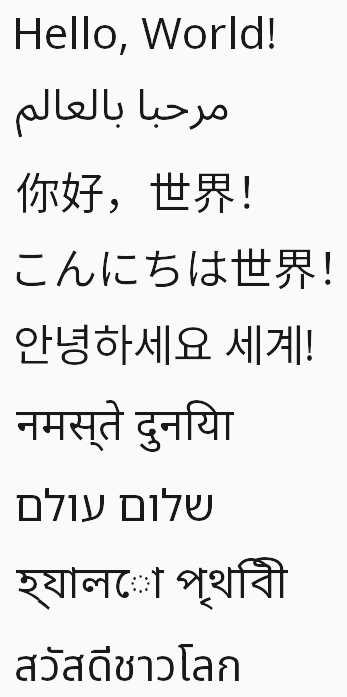 Nine languages, one stack |
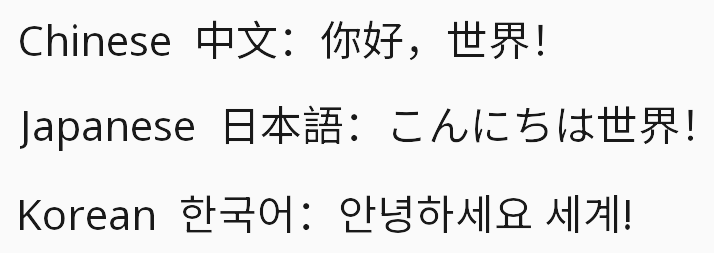 Chinese · Japanese · Korean |
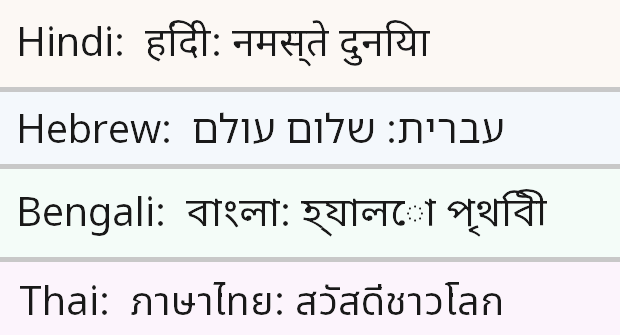 Devanagari · Hebrew · Bengali · Thai |
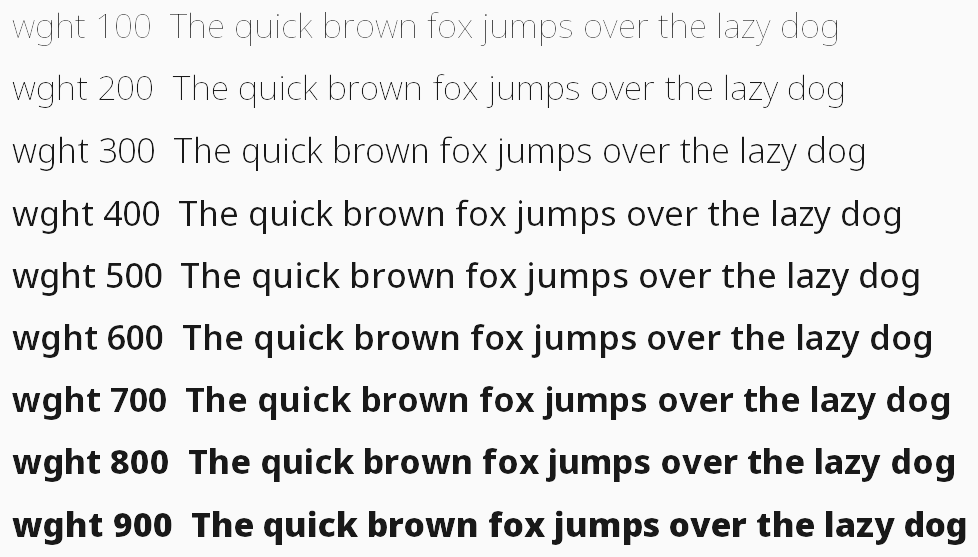 Variable font weight axis (wght 100–900) |
 Mixed Arabic + Latin - BiDi reordering applied automatically |
|
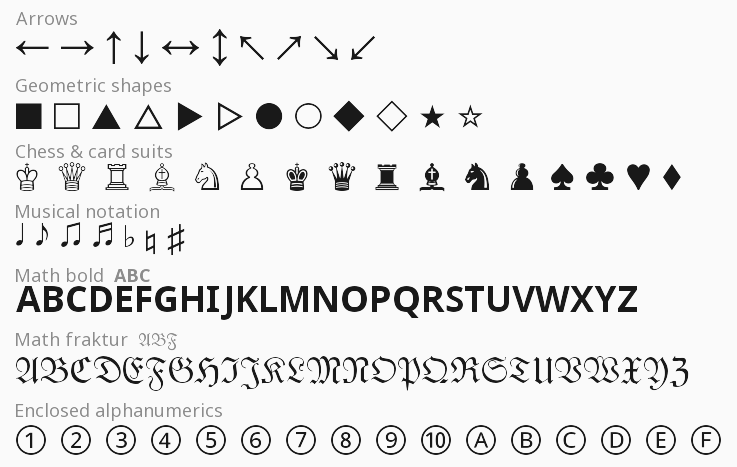 Symbols · Math alphanumerics · Box drawing · Arrows |
|
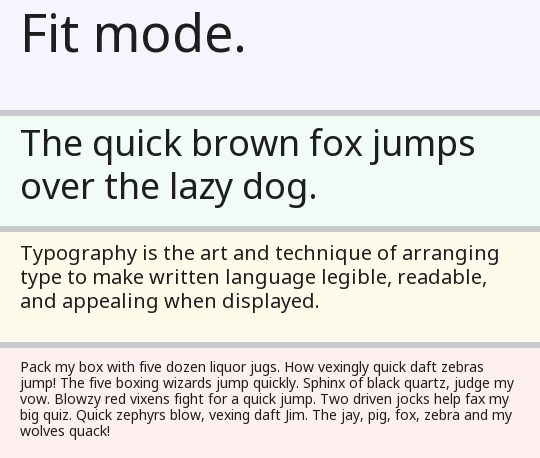 Fit mode - wrap → shrink → truncate, all four strips share the same bounding box |
|
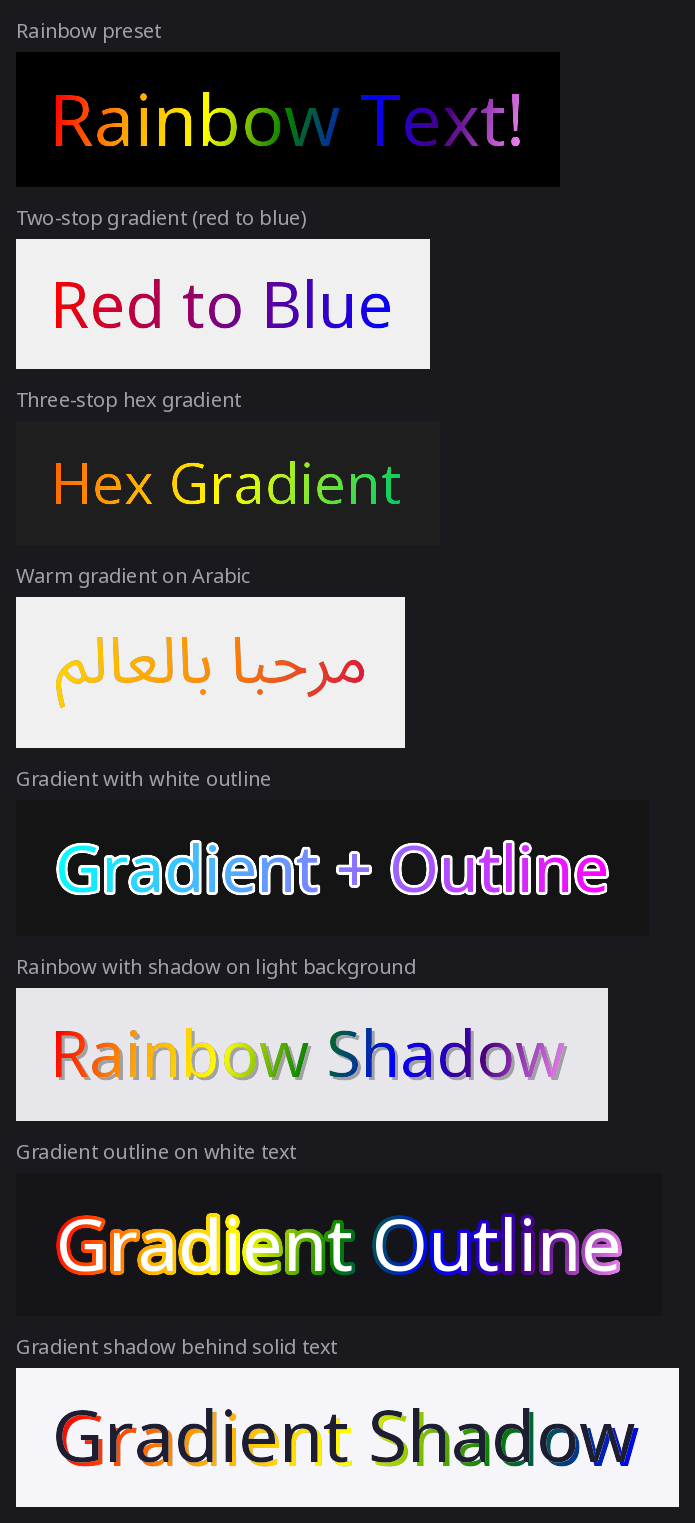 Gradient fills, gradient outlines, gradient shadows |
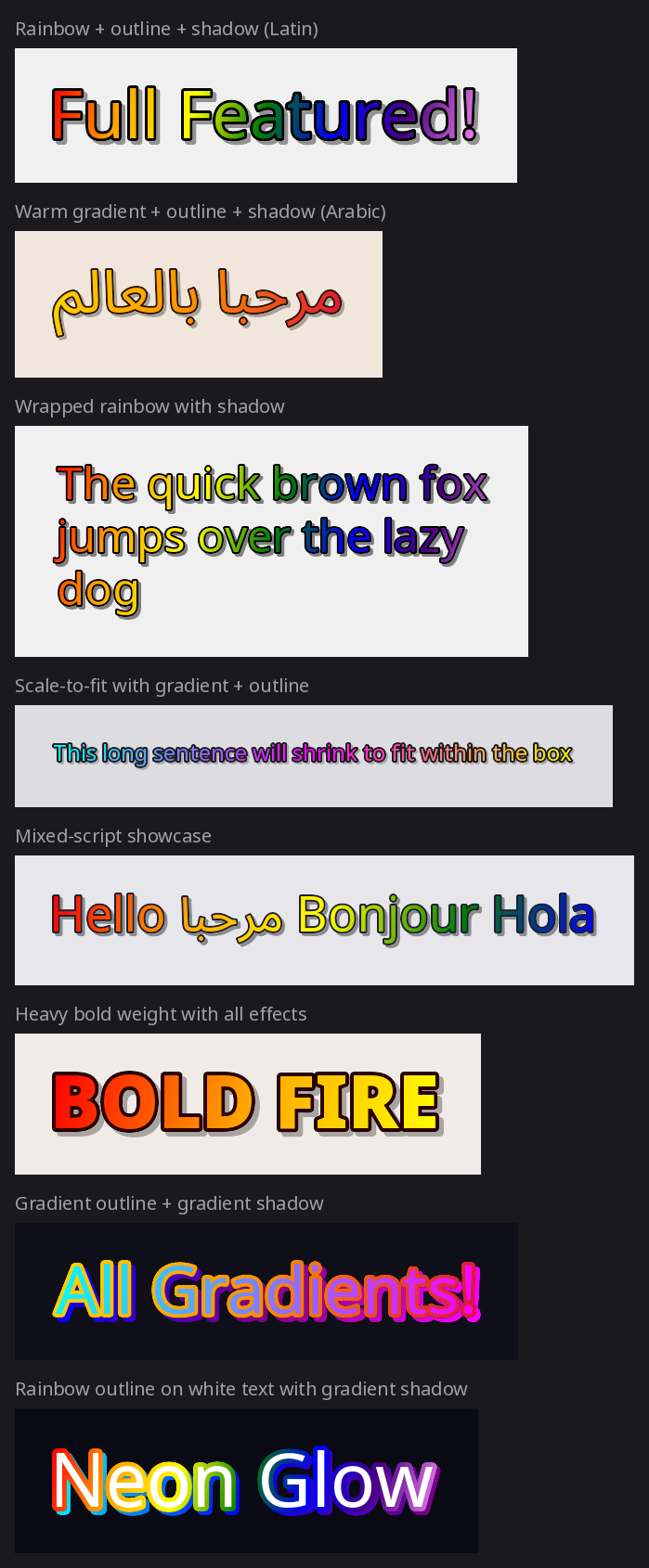 All effects combined - gradient + outline + shadow |
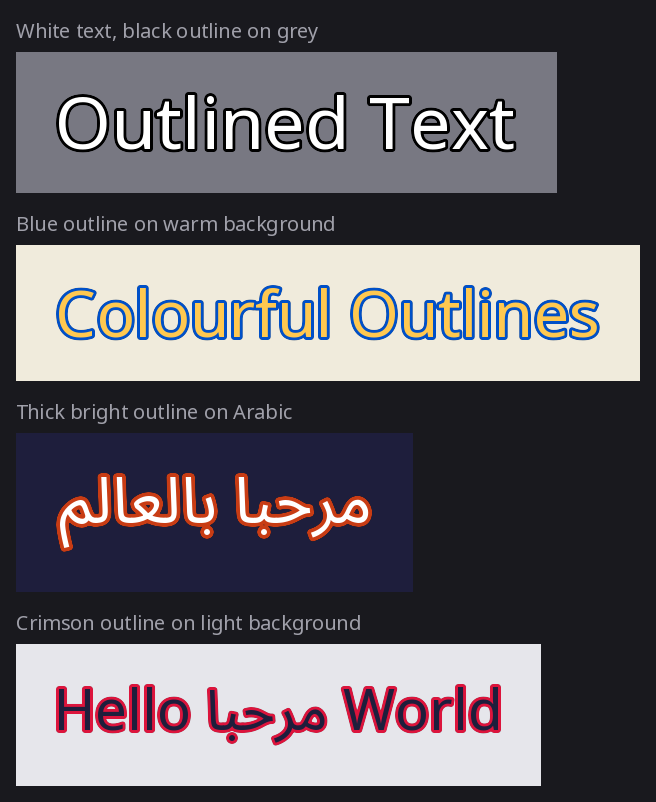 Text outlines on Latin, Arabic, and mixed scripts |
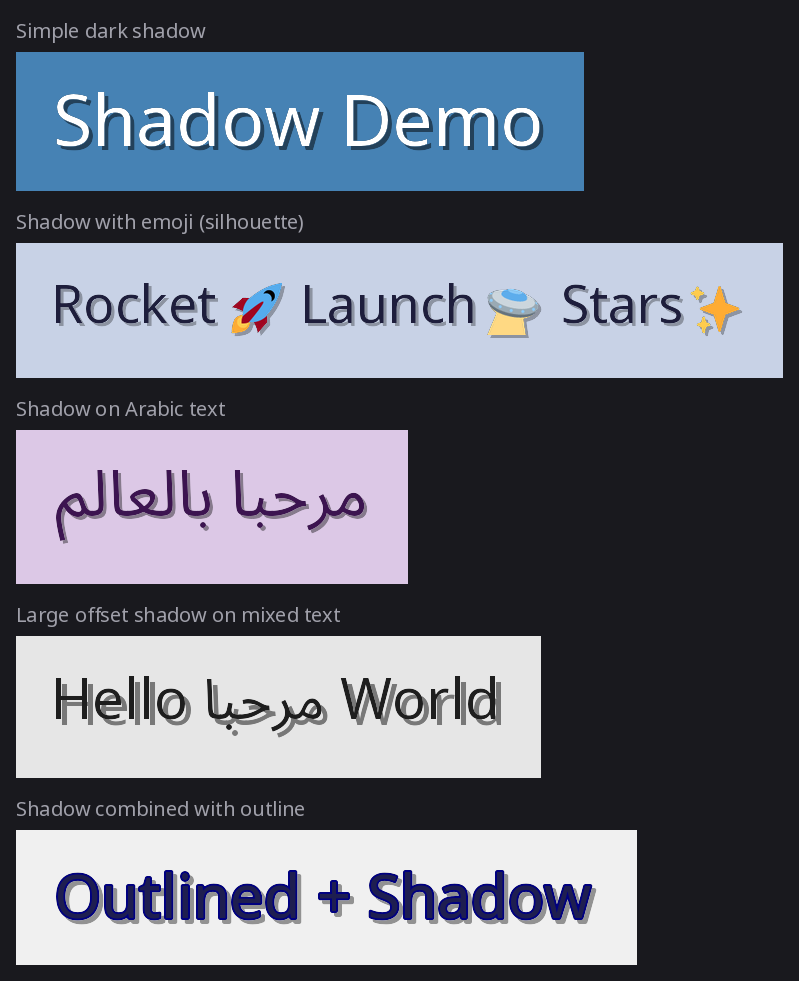 Drop shadows with emoji silhouettes |
pip install fontstackNote: FontStack does not bundle fonts. See Recommended Font Stack below for a curated set of free Noto fonts that provide near-complete Unicode coverage.
from fontstack import FontConfig, FontManager

manager = FontManager(
    default_stack=[
        FontConfig(path="fonts/NotoSans[wdth,wght].ttf"),
        FontConfig(path="fonts/NotoSansArabic[wdth,wght].ttf"),
    ]
)

# Or point to a directory and let FontStack discover all fonts
# (loaded alphabetically by filename - first file = primary font):
# manager = FontManager(font_dir="fonts/")

from PIL import Image

img = Image.new("RGBA", (800, 100), "white")
manager.draw(
    image=img,
    text="Hello مرحبا",
    position=(20, 20),
    size=48,
    weight=700,
    fill=(20, 20, 20),
)
img.save("output.png")from fontstack import FontConfig, FontManager, VariationAxes
# Option 1: explicit font stack (full control over fallback order)
manager = FontManager(
default_stack=[
# Primary font: Noto Sans variable (Latin, Cyrillic, Greek)
FontConfig(path="fonts/NotoSans[wdth,wght].ttf"),
# Fallback 1: Noto Sans Arabic (Arabic, Persian, Urdu)
FontConfig(path="fonts/NotoSansArabic[wdth,wght].ttf"),
# Fallback 2: Noto Sans SC/JP/KR (Simplified Chinese / Japanese / Korean)
FontConfig(path="fonts/NotoSansSC[wght].ttf"),
FontConfig(path="fonts/NotoSansJP[wght].ttf"),
FontConfig(path="fonts/NotoSansKR[wght].ttf"),
]
)
# Option 2: scan a directory (auto-discovers all .ttf/.otf/.ttc/.otc files)
# Fonts are loaded in alphabetical order by filename, so the first file
# becomes the primary font and later files act as fallbacks.
manager = FontManager(font_dir="fonts/")
from PIL import Image
img = Image.new("RGBA", (1000, 200), "white")
w, h = manager.draw(
image=img,
text="Hello 世界 مرحبا 🌍",
position=(20, 40),
size=48,
weight=700,
mode="wrap",
max_width=960,
align="center",
fill=(30, 30, 30),
)
print(f"Rendered {w}×{h} px")
img.save("output.png")Returns a new PIL.Image.Image cropped tightly to the rendered text, no canvas management needed.
from fontstack import FontConfig, draw_text

img = draw_text(
    text="Hello 世界 مرحبا 🌍",
    font_stack=[
        FontConfig(path="fonts/NotoSans[wdth,wght].ttf"),
        FontConfig(path="fonts/NotoSansArabic[wdth,wght].ttf"),
    ],
    size=48,
    weight=700,
    fill=(20, 20, 20),
    background="white",
    padding=16,
)
img.save("hello.png")from fontstack import FontConfig, VariationAxes
# Narrow, light weight, slightly slanted
FontConfig(
path="fonts/NotoSans[wdth,wght].ttf",
axes=VariationAxes(wght=300.0, wdth=75.0, slnt=-10.0),
)Standard axes in VariationAxes: wght (weight, 100–900), wdth (width, 50–200), ital (italic, 0–1), slnt (slant, degrees), opsz (optical size).
# "wrap" - word-wrap at max_width, font size unchanged
manager.draw(img, long_text, position=(0, 0), size=32,
                    mode="wrap", max_width=400)

# "scale" - shrink font until the full text fits on a single line;
#             truncates with "…" if the text is still too wide at min_size
manager.draw(img, long_text, position=(0, 0), size=32,
                    mode="scale", max_width=400, min_size=10)

# "fit" - wrap first, then shrink until the block fits within max_width × max_height;
#           if the block still overflows at min_size the last visible line is
#           truncated with "…"
manager.draw(img, long_text, position=(0, 0), size=32,
mode="fit", max_width=400, max_height=120, min_size=10)# Gradient fill (diagonal by default so each line gets different hues)
manager.draw(img, "Gradient!", position=(20, 20), size=64,
fill="red-gold-orange")
# Pure left-to-right gradient (no diagonal)
manager.draw(img, "Gradient!", position=(20, 20), size=64,
fill="red-gold-orange", gradient_angle=0.0)
# Outline with solid stroke color
manager.draw(img, "Outlined", position=(20, 120), size=64,
fill="white", stroke_width=3, stroke_fill="black")
# Drop shadow (shadow includes the outline shape when stroke_width > 0)
manager.draw(img, "Shadow", position=(20, 220), size=64,
fill="white", shadow_color=(0, 0, 0, 120),
shadow_offset=(4, 4))
# Everything at once: gradient fill + gradient outline + gradient shadow
manager.draw(img, "All Effects!", position=(20, 320), size=64,
fill="red-orange-gold",
stroke_width=3, stroke_fill="blue-cyan",
shadow_color="gray-darkgray", shadow_offset=(3, 3))
# Rainbow preset
manager.draw(img, "Rainbow!", position=(20, 420), size=64,
fill="rainbow")Reusing a FontManager across many draw_text calls avoids re-parsing cmaps for every image.
from fontstack import FontConfig, FontManager, draw_text

mgr = FontManager(default_stack=[FontConfig(path="fonts/NotoSans[wdth,wght].ttf")])

labels = ["First", "Second", "Third", ...]
images = [draw_text(label, font_stack=[], manager=mgr, size=32) for label in labels]All fonts below are from Google's Noto family, licensed under the SIL Open Font License 1.1 (free for commercial use).
| # | Font | Scripts covered | Size | Download |
|---|---|---|---|---|
| 1 | Noto Sans [wdth,wght].ttf |
Latin, Cyrillic, Greek, Latin Extended | ~1.1 MB | Google Fonts |
| 2 | Noto Sans Arabic [wdth,wght].ttf |
Arabic, Persian, Urdu | ~840 KB | Google Fonts |
| 3 | Noto Sans SC [wght].ttf |
Simplified Chinese | ~17 MB | Google Fonts |
| 4 | Noto Sans JP [wght].ttf |
Japanese | ~9.4 MB | Google Fonts |
| 5 | Noto Sans KR [wght].ttf |
Korean | ~10 MB | Google Fonts |
| 6 | Noto Sans Devanagari [wdth,wght].ttf |
Hindi, Sanskrit, Marathi, Nepali | ~632 KB | Google Fonts |
| 7 | Noto Sans Hebrew [wdth,wght].ttf |
Hebrew, Yiddish | ~110 KB | Google Fonts |
| 8 | Noto Sans Bengali [wdth,wght].ttf |
Bengali, Assamese | ~454 KB | Google Fonts |
| 9 | Noto Sans Thai [wdth,wght].ttf |
Thai | ~214 KB | Google Fonts |
Emoji are handled by Pilmoji/Twemoji automatically, no emoji font needed in the stack.
Create with an explicit default_stack or a font_dir path (mutually exclusive). When font_dir is given, all .ttf, .otf, .ttc, .otc files in the directory are scanned and sorted alphabetically by filename (case-insensitive). The first file in that order becomes the primary font; the rest serve as fallbacks.
| Method / Property | Returns | Description |
|---|---|---|
draw(image, text, position, ...) |
tuple[int, int] |
Draw text onto an existing image in-place. Returns (width, height) of the rendered bounding box. |
get_font_chain(size, weight, custom_stack) |
list[FreeTypeFont] |
Return loaded font objects for the given size/weight (LRU-cached). |
default_stack |
list[FontConfig] |
Read-only copy of the stack (auto-built from font_dir if used). |
font_dir |
str | Path | None |
The font directory passed at construction, or None. |
| Parameter | Type | Default | Description |
|---|---|---|---|
size |
int |
40 |
Starting font size in points. |
weight |
int | str |
400 |
Font weight axis value or named style string (e.g. 700 or "Bold"). |
mode |
"wrap" | "scale" | "fit" |
"wrap" |
Rendering mode. |
max_width |
int | None |
None |
Maximum line width in pixels. |
max_height |
int | None |
None |
Maximum block height in pixels ("fit" mode only). |
min_size |
int |
12 |
Minimum font size for "scale" and "fit" modes. |
align |
"left" | "center" | "right" |
"left" |
Horizontal alignment within the text block. |
line_spacing |
float |
1.2 |
Line-height multiplier (1.0 = tight, 1.5 = loose). |
fill |
FillType |
"black" |
Text color: color name, RGB/RGBA tuple, palette integer, or gradient string. |
stroke_width |
int |
0 |
Outline thickness in pixels around each glyph. |
stroke_fill |
FillType | None |
None |
Outline color. Same value types as fill, including gradients. |
shadow_color |
FillType | None |
None |
Drop-shadow color. Same value types as fill, including gradients. |
shadow_offset |
tuple[int, int] |
(2, 2) |
Shadow pixel offset (x, y). |
gradient_angle |
float |
15.0 |
Gradient direction in degrees (0 = left-to-right, 15 = slight diagonal). |
font_stack |
list[FontConfig] | None |
None |
Per-call font stack override; falls back to default_stack. |
emoji_source |
BaseSource |
Twemoji |
Pilmoji emoji image source. |
Convenience wrapper: creates a FontManager (or reuses one via manager=), renders text, and returns a new RGBA image cropped to the result with optional padding and background. Also accepts font_dir= as an alternative to font_stack.
Scan a directory for font files (.ttf, .otf, .ttc, .otc) and return a list of FontConfig entries sorted alphabetically by filename (case-insensitive). The first entry becomes the primary font when passed to FontManager. TTC/OTC collections produce one entry per member font. Useful for inspecting what font_dir= will discover, or for building a custom stack from a directory listing.
| Field | Type | Default | Description |
|---|---|---|---|
path |
str |
required | Path to TTF, OTF, TTC, or OTC file. |
axes |
VariationAxes | None |
None |
Default variable font axis values. |
ttc_index |
int |
0 |
Index within a TTC/OTC collection. |
wght · wdth · ital · slnt · opsz
- Python 3.11+
- Pillow ≥ 12.2
- pilmoji ≥ 2.0.5
- fonttools ≥ 4.62
- python-bidi ≥ 0.6.7
- arabic-reshaper ≥ 3.0.0
MIT © 2026 Kanin